


Remote hiring has made onboarding faster and more flexible, but it has also moved sensitive HR processes outside the office. Offer letters, confidentiality agreements, payroll forms, policy acknowledgments, and benefits documents may now pass between candidates, recruiters, managers, and compliance teams across different systems and locations.
For enterprise HR teams, onboarding eSignatures should therefore do more than replace handwritten signatures. A well-designed process should help confirm who received a document, control who needs to act, prevent incomplete submissions, protect sensitive information, and retain reliable evidence after signing. These requirements become especially relevant in healthcare, finance, legal services, and other regulated sectors.
In an office, HR can check documents in person, identify missing information, confirm approvals, and collect completed records. Remote onboarding distributes these actions across email, HR platforms, eSignature tools, and document repositories.
Without a defined workflow, HR can encounter outdated documents, missing signatures, incorrect routing, duplicate versions, or incomplete employee records. These issues create administrative work during onboarding and can become more serious when an agreement or policy acknowledgment is questioned later.
For example, if an employee disputes signing a confidentiality agreement, HR may need to establish which version was sent, when it was accessed, how the signer was authenticated, when it was completed, and what record was retained afterward. A basic "completed" status provides limited context. This is why the quality of the signing record matters alongside the signature itself.
A secure digital hiring process starts with consistent document preparation. Approved templates reduce the risk of HR teams reusing old files or manually recreating frequently used agreements. Routing controls can then determine whether a document goes first to the candidate, hiring manager, HR administrator, or another approver.
Required fields help prevent forms from being submitted with missing dates, initials, signatures, or acknowledgments. Conditional fields can simplify complex forms by showing information only when it applies to the employee. For example, additional benefit fields may appear only when family coverage is selected.
These capabilities support HR workflow automation without removing necessary oversight. Automated reminders can reduce manual follow-up, while centralized status tracking helps HR identify which documents are complete and which still require action.
Authentication should also match the sensitivity of the document. A routine policy acknowledgment may require a different level of verification from an executive employment agreement, payroll authorization, or document containing sensitive personal information. Depending on organizational requirements, HR may use additional authentication methods such as one-time passcodes or enterprise identity systems.
Remote onboarding compliance is broader than obtaining an electronic signature. Organizations need to consider how documents are accessed, completed, stored, retained, and retrieved.
The specific requirements vary by jurisdiction, industry, document type, and internal policy. Healthcare organizations, for example, may handle employee health or benefits information. Financial institutions may onboard employees who will access customer data, payment systems, or confidential financial information. Legal services organizations frequently manage confidentiality agreements, conflict disclosures, and policies governing access to client information.
In each case, the signing platform forms only one part of the organization's compliance process. HR, legal, compliance, and IT teams should determine what authentication, privacy, retention, and recordkeeping requirements apply to their workflows.
The final signed document shows what was agreed, but HR may also need evidence explaining how the transaction occurred.
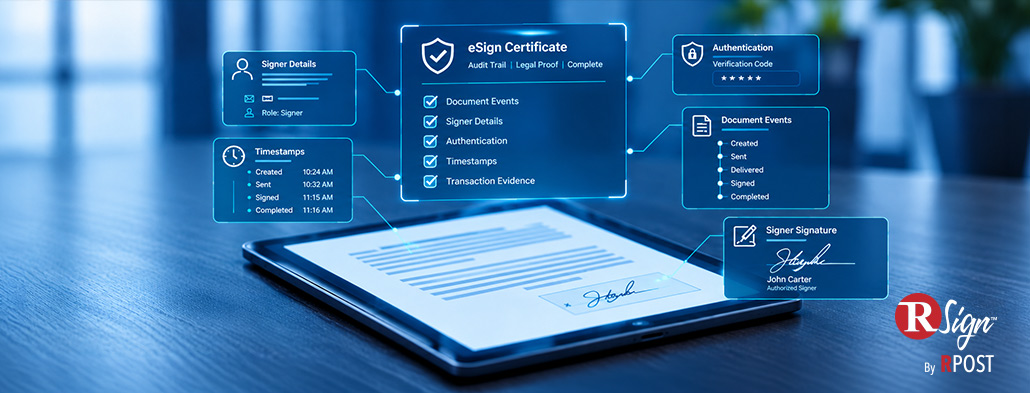
A detailed forensic audit trail eSign record may capture timestamps, recipient actions, authentication events, document activity, signing history, and information associated with the completed agreement. The exact information depends on the platform and workflow configuration.
This evidence can be useful during employment disputes, internal investigations, or compliance reviews. If an employee questions whether a policy was presented or accepted, HR can review the transaction history rather than relying only on the visible signature.
This does not mean an audit trail automatically determines whether an agreement is legally enforceable. The legal status of legally binding employment contracts depends on applicable laws, the document involved, the signing process, and the available evidence.
The operational benefit of onboarding eSignatures comes from creating a repeatable process.
Reusable templates can standardize commonly used documents. Defined signing sequences can control approvals. Required fields reduce incomplete forms. Automated reminders can reduce manual follow-up, while centralized tracking gives HR a clearer view of onboarding progress.
These controls become especially useful during high-volume hiring, seasonal recruitment, acquisitions, or expansion into new locations. Instead of manually configuring each transaction, HR can apply consistent workflow rules across larger groups while still personalizing documents where needed.
RSign can support these workflows through reusable templates, guided signing, routing controls, conditional fields, reminders, bulk distribution, authentication options, and detailed transaction records. HR teams can apply these capabilities to employment agreements, confidentiality documents, policy acknowledgments, onboarding forms, and other recurring signing processes.
RSign also positions its Legal Proof® capabilities around preserving evidence associated with an eSignature transaction. This can provide HR, compliance, and legal teams with a more detailed record when a completed agreement is later reviewed or questioned. Any claim that this evidence provides greater legal protection than a specific competing platform requires supporting comparative evidence and legal approval.
October 19, 2026

September 22, 2026
August 20, 2026

July 20, 2026

June 24, 2026




 Blog
Blog