

RSign for Nest Macaw

RSign for Nest Macaw

App Overview:

The RSign® service for Nest integration allows Nest users to send quotation documents for electronic signature directly from their Nest client account using the RSign® system. It enables users to automatically receive the signed documents in the corresponding Nest Customer record. Specifically, RSign for Nest Macaw allows you to:

  • Send quotation documents for eSignature directly from the Macaw Customer record.
  • Utilize RSign Smart Tags capabilities to prepare documents for eSignature easily.
  • Automatic creation of the quotation document for eSignature.
  • Automatically receive the signed docs and save them within the Customer record in Macaw, ensuring easy access and record keeping.
  • Ensure adherence to regulatory standards as GDPR, HIPAA, eIDAS, UETA, ESIGN, and more.
  • Receive a Signature Certificate, a robust legal eSign audit trail including the transaction’s forensics.

RSign and eSignatures by RPost® have a proven track record of more than a decade, serving governments and businesses of all sizes in over 100 countries worldwide.

Note: RPost One for Windows OS (free of charge) seamlessly extends eSignature capabilities to any web or desktop application.
Click Here to Get Started

Product Tour

How it Works:

To send quotations documents for eSignature from your Nest Macaw interface, follow these steps:

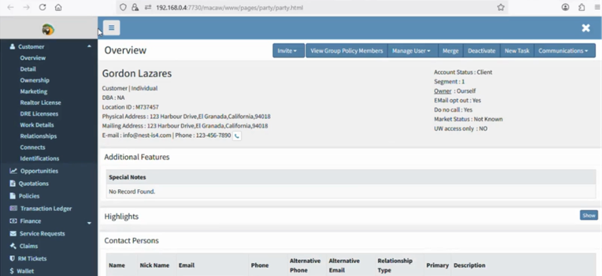
  1. Navigate to the Customer list and select the customer you want to create a Quotation for.
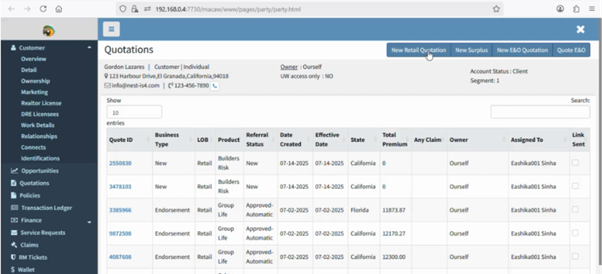
  2. Once in the customer record click on the Quotations section on the left panel. You will be redirected to the Customer’s Quotations list.
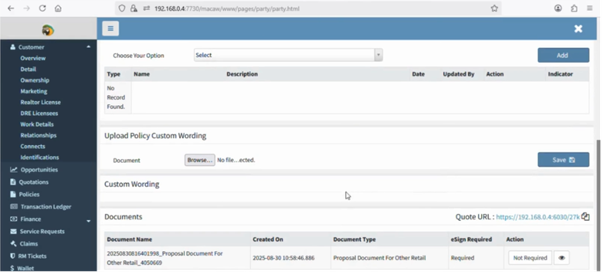
  3. By clicking on the New Retail Quotation button, you will start a new Customer’s quotation record. From this point, you will need to complete all the necessary information for the new quote.
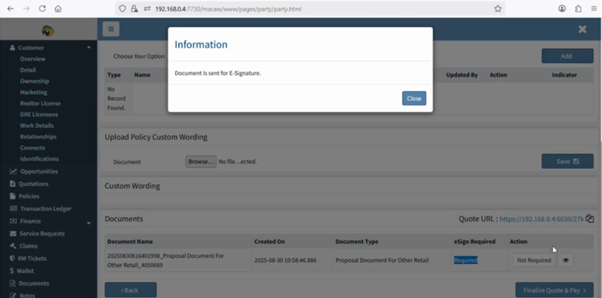
  4. If the eSign Required is set as Required, as in the previous screenshot, the following pop-up will appear after clicking on the Finalize Quote & Pay button. This indicates that the Quotation document was sent for eSignature.
  5. The customer receives the quotation URL via email.
  6. The customer goes to the quotation URL and the quotation is ready to be signed.
  7. By clicking on the Sign and Buy button, the RSign® service is triggered showing the corresponding quotation document.
  8. After reviewing and adding the eSignature to the quotation document the customer needs to click on Finish. The following Success pop-up will appear.
  9. The customer will then be redirected to the Payment Options section in Nest to continue the process.
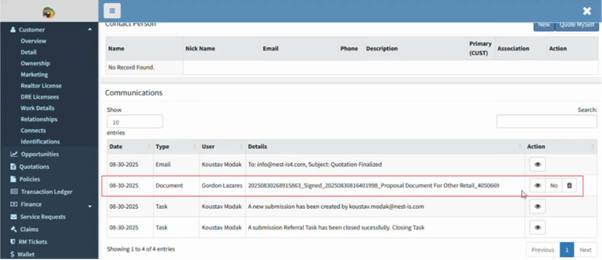
  10. Once the signer completes the eSignature process, the signed document is automatically attached to the Customer’s record.
  11. By clicking on the eye button, the final signed document will be displayed.
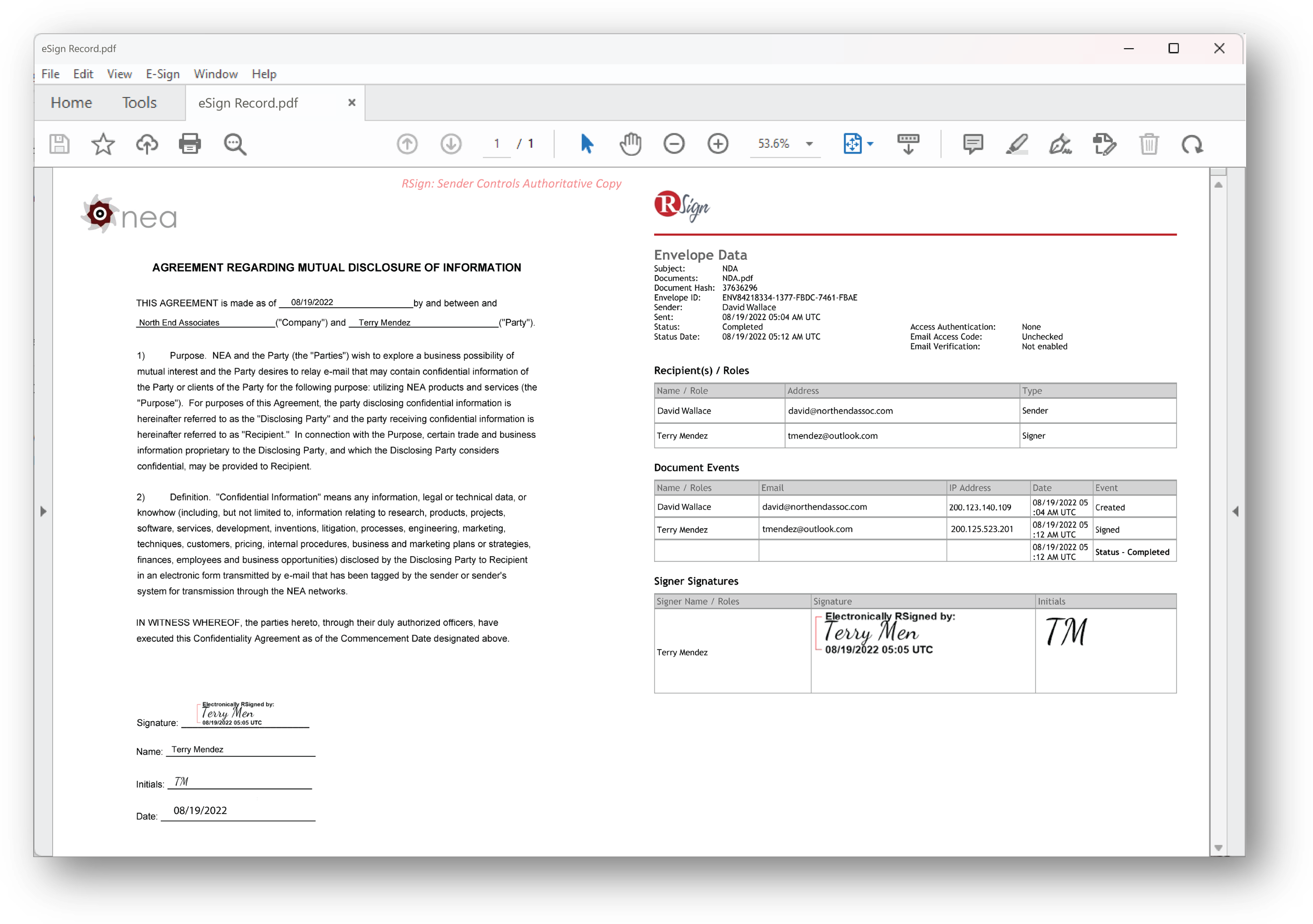
  12. The Envelope Data is placed at the end of the final signed document.

With RSign for Nest Macaw, you gain a seamless eSignature solution that integrates effortlessly with your Nest Macaw platform. Simplify quotation processes and streamline eSignature workflows, ensuring digital transformation and operational efficiency.

Don’t miss out on the benefits of RSign for Nest Macaw—get started today!

Get Started 

Enabling the RSign for Nest Macaw Integration

Setup Guide
User Guide

Getting Started with RSign

RSign Admin Quick Guide RSign User Quick Guide

Customer Stories

GGZ Rivierduinen

Health Tech

We‘re helping GGZ Rivierduinen’s HR Department be GDPR compliant with secure e-sign communications.

Read More

Tracy-Driscoll & Co. Insurance

Insur Tech

We’re helping Tracy-Driscoll & Co. serve its clients faster, empowering staff with the best tech essentials for the business of insurance.

Read More

Impellam

Legal Tech

We’re helping Impellam speed placement of people from around the world into great companies, seamlessly.

Read More

App Info

Version:

RSign for Nest Macaw

Languages Supported:

App Language:

RSign interface languages: Danish, Dutch, English, French, German, Italian, Latvian, Lithuanian, Polish, Portuguese, Spanish.

Service Language (Messages, Receipts, etc.):

anish, Dutch, English, French, German, Italian, Latvian, Lithuanian, Polish, Portuguese, Spanish.

Minimum Requirements:

Operating System Any
Browsers Any
Browser Version Latest
Deployment company-wide deployment
Updates Automatic upgrades
Requirements Valid RSign and Nest Macaw licenses
Licensing Per user, shared group of users, or usage-based